
Contents
How PaddleSubs Works
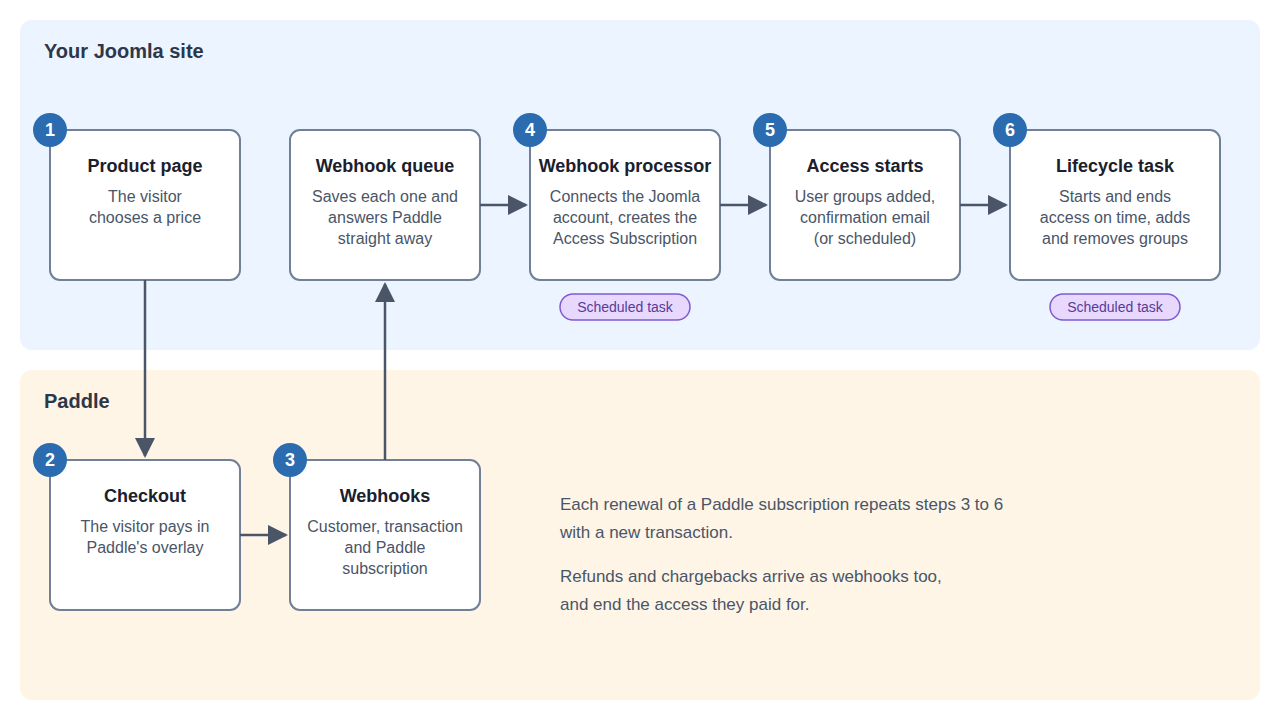
-
A visitor opens a product page on your site and chooses a price. Paddle's checkout opens on top of the page. If the visitor is logged in, their email address is already filled in.
-
The visitor pays. Paddle shows them that the payment worked, and your site shows the Purchase Complete page.
-
Paddle sends your site a series of webhooks: the customer, the transaction as it is created and then completed, and for a recurring price the Paddle subscription. Your site saves each one in a queue and answers Paddle straight away.
-
The webhook processor, a Joomla scheduled task, works through the queue in order. It connects the Paddle customer to a Joomla account by email address, creating the account if there isn't one, records the transaction and creates an Access Subscription for each product bought.
-
If the Access Subscription starts now, the customer is added to the product's user groups and is sent a confirmation email. If it starts later (because it extends time they already have), it is scheduled, and they are told when it will start.
-
The lifecycle task, another scheduled task, starts Access Subscriptions whose time has come and ends those whose time is over, adding and removing groups as it goes.
Each renewal of a Paddle subscription repeats steps 3 to 6 with a new transaction. A refund or chargeback arrives as a webhook too, and ends the access it paid for.
Important
Steps 4 and 6 only happen if the scheduled tasks run. Joomla runs scheduled tasks when people visit your site, or on a timer you set up on your server. A quiet site with no timer can leave a customer waiting for access. the section called “Setting Up the Scheduled Tasks” explains how to set this up properly.